The cybersecurity landscape is changing rapidly, with new threats emerging all the time, thanks to the widespread adoption of AI. Generative AI is enabling attackers to create and launch increasingly sophisticated cyberattacks at scale, and many businesses don’t have the defenses in place to keep their assets safe.
Let’s look at the healthcare industry. According to data from the HIPAA Journal, almost 85% of the population of the United States was affected by healthcare data breaches in 2024. And while the volume dropped to more normal levels in 2025, it demonstrates the sheer potential scale of the problem we’re facing.
2026 research from PWC indicates that almost two-thirds of threats to the healthcare sector are from cyber crime — more than double the second-biggest threat, espionage:
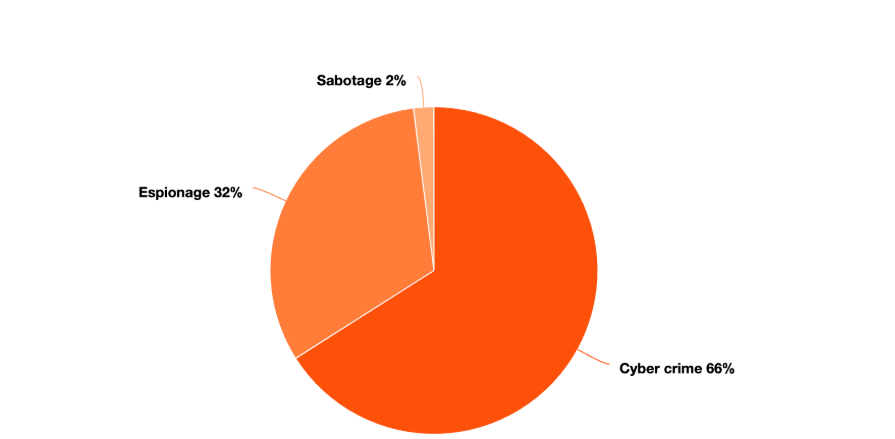
Healthcare services hold extremely sensitive, high-value data, so it makes sense that they’re a target for cyber criminals. But they’re not the only ones. PWC also highlights cyber crime as the biggest threat to professional services (70%), assets and wealth management (65%), and financial services (49%).
Conducting a cybersecurity risk assessment helps businesses in all sectors understand what they’re up against. In 2026, it’s no small feat – so let’s take a look at what a cybersecurity risk assessment is, why you need one, and how to perform your IT security risk assessment.
What is a cybersecurity risk assessment?
A cybersecurity risk assessment is a working process that identifies the current threats to the IT security setup in your organization. It maps these threats against vulnerabilities in your infrastructure to determine where and how you can defend your organization against cybersecurity attacks.
Do you need an IT security risk assessment?
For most organizations, the answer is yes — you do need a cybersecurity risk assessment. Any organization that conducts all, most, or even some of its business online should know the current risks it faces to its online infrastructure.
Even one-person businesses and solopreneurs should undertake an IT security risk assessment if any of your work is undertaken online. This includes email, social media, and accounting, as all of these areas can be exploited by cybercriminals.
Why should you risk assess your cybersecurity systems?
There are lots of tangible reasons to perform an IT security risk assessment:
- Reduce the risk of fines and penalties — Multiple regulatory bodies can levy fines against companies who incur data breaches or other cybersecurity violations. For example, HIPAA penalties range from $145 to $73,011 per violation category per year.
- Minimize other financial loss — Regulatory fines aren’t the only way to lose money from a cyberattack. Disrupted operations, ransomware payments, and prolonged investigations can all impact your bottom line.
- Protect customer trust and loyalty — Customers are becoming increasingly cautious about sharing their data online. Businesses with a history of data breaches may miss out on new customers, as well as losing the loyalty of existing customers.
- Avoid operational disruption — Downtime caused by DDoS attacks and other cybersecurity threats can cause sustained operational downtime, leading to financial losses and customer frustration.
- Identify and stop attacks quickly — Companies who understand their current IT infrastructure are in a strong position to identify and stop attacks quickly, minimizing the chances of significant losses or downtime.
- Maintain compliance — Regulators, suppliers and customers may require you to comply with specific regulations in your industry. A risk assessment can help you ensure you’re compliant with current guidelines.
Cyber risk assessment frameworks
Choosing a cyber risk assessment framework is a good place to start if you haven’t conducted one before. These frameworks are used by major organizations to identify threats and mitigate risks, improving your overall online security.
Some organizations choose to get an official audit to prove their compliance with these frameworks. This isn’t necessary for all businesses, but some are required to in order to operate lawfully, while others find these accreditations useful as a sales and marketing tool.
Here are some of the major cybersecurity risk assessment frameworks to consider using in your organization.
ISO 27001

ISO 27001 is the International Organization for Standardization (ISO) standard for information security. A globally recognized accreditation, it’s ideal for organizations with a global customer base, as well as those who want to demonstrate a long-term commitment to strong information security.
Download the latest ISO 27001 framework guidelines here. This is a comprehensive standard that may be daunting to new in-house risk assessors, so you could consider using a solution like Dash ComplyOps to automate ISO 27001 compliance in your business.
SOC 2

The Service and Organization Controls (SOC) 2 report is based on an auditing standard issued by the American Institute of Certified Public Accountants (AICPA). It’s designed to allow an organization to evaluate risk and internal controls related to security, availability, processing integrity, confidentiality, and privacy.
Organizations face constant security evaluations from enterprises, partners, and investors. To streamline this process, validate internal controls, and establish trust, teams often work to achieve a SOC 2 report.
See our full guide to SOC 2 risk assessment and learn how Dash ComplyOps can help achieve SOC 2 compliance. Additionally, download our free SOC 2 risk assessment template to guide you through the process.
PCI DSS

PCI DSS — or the Payment Card Industry Data Security Standard — is a regulatory standard designed to enhance payment card account data security around the world. US-based companies handling payment processing/credit card data are required to comply with PCI DSS.
Take a look at the most recent PCI DSS standards. Dash ComplyOps for PCI DSS can help you prepare your site and online infrastructure to comply with the PCI DSS standard.
NIST 800-53

The NIST 800-53 was originally developed as an information security framework for U.S. federal agencies to use, but it has since been adapted for wider use among a broad range of businesses. The most recent version of NIST 800-53 is available to download here.
Like other broad cybersecurity frameworks, NIST 800-53 can be daunting if you’re unused to conducting risk assessments. But more U.S. businesses are being asked to comply, so it’s important to ensure you understand what this risk assessment framework entails. That’s why Dash ComplyOps is designed to help businesses comply with the NIST 800-53 framework using a simple automated solution.
HIPAA/HITECH

By law, healthcare companies and organizations handling protected health information (PHI) are required to comply with HIPAA regulations (and the subsequent HITECH act). So if you’re in the healthcare industry it’s essential to understand the HIPAA framework and conduct a risk assessment for HIPAA specifically.
As with other widely used cybersecurity standards, you can find online automated solutions to help you comply with the HIPAA framework. Dash ComplyOps is designed for HIPAA compliance, enabling you to monitor and maintain a HIPAA-compliant infrastructure online.
Download our HIPAA risk assessment template to assist with your HIPAA compliance.
How to perform a cybersecurity security risk assessment: a step-by-step guide
Now you know why you need to risk assess your IT security — and how international standards can help you achieve the highest levels of information and data security — it’s time to actually start your cybersecurity risk assessment.
We’ve broken the process down into individual steps. Here’s how to perform a comprehensive cybersecurity security risk assessment in 2026.
1. Define the scope & stakeholders
TL;DR: Set an objective and determine who needs to be involved in the process.
The full version:
Start by defining the scope of your risk assessment. If you haven’t done one before, break your infrastructure down into smaller areas and tackle them one-by-one. This will keep your assessment on track without causing overwhelm. Then decide who will be involved in this specific area of the risk assessment.
Example:
| Scope | Cybersecurity risks in finance team | Stakeholders |
| – Risk assessor
– CEO – IT team – DevOps team – Finance team manager – Finance team members |
2. Map your assets
TL;DR: List all the assets relevant to the scope of the assessment. Assign a value to each asset: low, medium, high, or critical.
The full version:
Make a list of all the assets you will be assessing as part of your cybersecurity risk assessment. The list should be comprehensive, but it shouldn’t ignore the scope of the assessment you defined in step 1.
Categorize your assets into hardware, software, data, people, and processes (or the categories that best suit your organization).
Finally, classify the value of each of your assets. This will come in handy later when you’re assessing the impact of potential threats. Dash RiskOps enables teams to create an IT asset inventory and quickly classify organization assets.
Classifying assets in an IT security risk assessmentSome frameworks will give you a precise definition of what counts as a ‘critical’ asset versus a ‘low’ value asset. But if you’re not using pre-determined definitions, here’s a quick guide to help you define the value of an asset:
|
Example:
Continuing with the scope we set out in step 1, here’s what asset mapping might look like:
| Asset | Category | Value | Laptops | Hardware | Critical | Mobile phones | Hardware | High | Cloud-based accounting software | Software | Critical | Payroll processing platform | Software | Critical | Business bank account | Software | Critical | Email accounts | Software | High | Financial data | Data | Critical | Customer invoice data | Data | Critical | Staff | People | Critical | Finance process documents | Processes | Medium | Cloud networking rules | Processes | High | Production application database | Data | Critical |
3. Identify threats
TL;DR: Consider your list of assets and make a list of potential threats that could affect each one.
The full version:
Go through your list of assets and identify the potential threats that could compromise each of them. U.S. businesses often consider the following as part of the threat identification process:
- Phishing attempts
- Ransomware
- DDoS attacks
- Fraud
- Individual security threats (e.g. mugging)
- Accidental employee action
- Malicious employee action
- Natural disasters
- Cloud software outages
- Supply chain failures
This list isn’t exhaustive, so make sure to carefully consider potential threats to each of your assets.
Example:
Continuing with the scope we set out in step 1, here are the threats you might encounter for three assets:
| Asset | Threats | Laptops |
| – Theft
– Loss – Destruction |
|
| Email accounts | – Phishing attempts
– Ransomware – Brute force attacks – Invoice fraud – Account takeover |
| Customer invoice data | – Data theft
– Data leak – Account takeover |
4. Identify vulnerabilities within your systems
TL;DR: Determine how the threats you’ve identified could actually occur within your existing systems.
The full version:
Look at your list of threats for each asset and consider how each threat could succeed based on your existing security setup.
Make sure your list accurately reflects your current security. Don’t miss vulnerabilities off because you think they’ll be fixed in a future update. This could be delayed, and you might forget about the issue, leaving you open to attack.
Dash RiskOps enables teams to create a live risk register to track emerging risks, conduct smart risk scoring, and account for controls and remediation.
Example:
| Asset | Threats | Vulnerabilities | Email accounts |
| Phishing attempts
Ransomware Brute force attacks Invoice fraud Account takeover |
Lack of staff training/awareness
Inadequate password security measures No process for verifying invoices No multifactor authentication |
5. List existing controls
TL;DR: For each risk, list the security measures you already have in place to combat or mitigate the risk.
The full version:
Assuming you’ve already taken some steps to protect your online infrastructure, you should now identify which controls are already in place to mitigate some of the risks you’ve identified. These controls might include:
- Firewalls
- Multifactor authentication
- Automatic backups
- Security training
- Access control policies
- Incident response plan
- Insurance policies
Even if your current controls are minimal right now, that’s OK — you just need a starting point to build from. Any risk controls you already have can be taken into account when analyzing risks in the next step.
Example:
| Risk | Current controls | Phishing attempts | Spam filters | Ransomware | None | Brute force attacks |
| Password strength requirement
Policy against password sharing Endpoint protection software |
|||||
6. Analyze the risks
TL;DR: Create a risk matrix to analyze and compare the probability and potential impact of each vulnerability you identified.
The full version:
In a spreadsheet, create a risk matrix that lists each risk, how likely it is to occur, and how significant the potential impact would be.
Use a scale of 1 to 5 (or whichever scale makes sense to you) to categorize the risks. Then multiply probability and impact to give you your overall risk score.
This will help you prioritize your risk mitigation tactics. Risks with the highest risk score should be tackled first, due to the heightened probability and impact.
Example
See the example cybersecurity risk assessment matrix below:
| Risk | Probability | Impact | Overall risk score |
| Phishing attempts | 4 | 4 | 16 |
| Ransomware | 2 | 5 | 10 |
| Brute force attacks | 3 | 4 | 12 |
| Invoice fraud | 2 | 4 | 8 |
7. Define additional controls needed
TL;DR: Create a list of potential additional controls to put in place to mitigate identified risks.
The full version:
Now you can see which threats are most likely (and which could have the biggest impact on your operations), you can decide how to build up your defenses. In general, it’s best to start with the risks that have the highest risk score, although it’s not always feasible to tackle these first.
Example:
| Risk | Current controls | Risk score | Additional controls | Phishing attempts | Spam filters | 16 |
| Staff training
Check/improve spam filters |
|||
| Ransomware | None | 10 | Staff training
Check/improve spam filters |
| Brute force attacks | Password requirement policy
Policy against password sharing Endpoint protection software |
||
| 12 | Introduce multi-factor authentication | Invoice fraud | Automated invoicing | 8 | Create invoice verification process |
8. Review findings with stakeholders
TL;DR: Review your IT security risk assessment with the stakeholders you identified in step 1.
The full version:
Ask stakeholders for their input on the risk assessment you’ve produced. They’re likely to be involved in any training opportunities you’ve identified and impacted by new policies and procedures, so this is an important part of the risk assessment process.
They may also identify additional threats or vulnerabilities you haven’t considered, so make the risk assessment a working document that can be continually refined and reviewed.
9. Implement next steps
TL;DR: Start implementing the additional controls you identified in step 7.
The full version:
Where possible, start implementing your next steps in order of priority. Tackle the most significant risks first (especially where you’ve identified quick wins) and work your way through the list until you’re satisfied you’ve mitigated the threats as much as possible.
Track your controls so you can refer back to them in future risk assessments.
10. Create a future roadmap
TL;DR: Decide how and when to tackle the next area of your business with a roadmap for the next few years.
The full version:
Cybersecurity risk assessment isn’t a one-and-done venture. Depending on the scale of your business, you’ll need to plan regular reviews of your IT security to make sure it’s always protected against possible attacks and vulnerabilities.
So what’s next for your business? Do you need to risk assess another team, or a specific product? Smaller companies may just be able to review their full online infrastructure in one go, and can plan the next risk assessment for 6-12 months later.
Talk to your stakeholders and create a roadmap for maintaining your IT security from now on.
Best practices for cybersecurity risk assessment
Feeling confident about starting your next cybersecurity risk assessment? You should be. Here are five best practices to help you perform a successful, efficiency IT security risk assessment in 2026:
- Standardize your risk scoring — Make sure to use a single standardized scoring system to classify your risks. This will help you monitor the effectiveness and progress of your risk assessments over time.
- Be realistic — Assessing your entire business online infrastructure might not be feasible within a two-week timeframe. Break your system down into more manageable areas to make progress more quickly.
- Make people accountable — Cybersecurity isn’t a one-person job. It’s down to everyone in your organization to take responsibility. Schedule training sessions so everyone knows what to do in the event of an IT security incident.
- Set a date for your next IT security review — Put a future date in your calendar to perform your next risk assessment and don’t shift it. Prioritize your cybersecurity to ensure your systems are continually monitored and maintained.
- Automate your IT security risk assessment — Use a secure, trustworthy IT risk assessment software like Dash to automate and simplify the process, saving you time and energy on cybersecurity maintenance.
How to simplify your cybersecurity risk assessment
Manual risk assessments work well when you have a dedicated team of IT security professionals on hand to support your efforts. But for smaller organizations and those without tech teams, keeping your business assets secure is a lot harder.
That’s where Dash RiskOps can help. Part of our ComplyOps program, our dedicated cybersecurity risk assessment platform streamlines the risk assessment process by:
- Collecting and managing all your IT assets and resources in one place.
- Automating your risk assessment process (so you don’t have to spend time manually updating spreadsheets).
- Setting up smart workflows so your team can quickly define scope, review controls, and track added controls.
- Sharing findings with agreed stakeholders automatically for transparency and collaboration.
- Creating a PDF risk report you can share with other relevant parties.
Book a demo at a time that suits you to see how Dash RiskOps works and how it could save you hours on risk assessment and manual IT security maintenance.
FAQs
Find out more about cyber risk assessments in these frequently asked questions.
How often should you perform a cyber risk assessment?
It depends on the nature and scale of your business, as well as your capacity. In general, it’s recommended that you risk assess your IT security at least once a year, though businesses that deal with highly sensitive data may want to increase the frequency.
If you are only conducting a risk assessment once a year, it’s important to have a background monitoring system like Dash RiskOps in place to automatically monitor your systems for breaches, leaks, and other cybersecurity issues in the meantime.
What’s the difference between an IT audit and IT security risk assessment?
An audit is normally conducted by an official auditor who is sent to verify compliance with a specific IT security framework. For example, if your business chooses to become ISO 27001 certified, you’ll need to undergo an audit with a qualified auditor.
An IT security risk assessment is an in-house investigation that helps you mitigate the security risks you’ve identified in your organization. While a record of risk assessments may be used as evidence in an audit, they don’t replace the need for an audit if you want to become certified.
What is an information security risk assessment?
An information security risk assessment analyzes and mitigates the risks of loss of data and information. It’s similar to an IT security risk assessment, though it can also focus on physical threats and vulnerabilities as well as those that occur online.
How do I know what threats to look for in my cybersecurity assessment?
There are many different sources of threat information out there. Look at previous incidents that may have affected your company, as well as those involving competitors and colleagues in your sector.
Take a look through the frameworks we mentioned earlier to see which threats are commonly identified. Sector-specific cybersecurity reports can also be a good source of information.
How can I continuously monitor my IT services for vulnerabilities?
The best way to continually monitor your online business environment is to set up an automated cybersecurity risk assessment software like Dash RiskOps. With a live risk assessment, you can mitigate online security threats without the need for constant human vigilance.
Dash RiskOps is part of our ComplyOps product, so you can also tie in many other features to create a full-stack compliance program that alerts you to compliance risks as well as security issues.
Do I need an independent cyber risk assessment?
While it’s not necessary for all businesses, an independent cyber risk assessment can bring significant benefits. The independent assessor can identify vulnerabilities you might have missed, give you an objective critique of your security setup, and offer independent, expert advice on what you can do to improve your online security.
Alternatively, an automated cyber risk assessment platform like Dash ComplyOps can provide many of these benefits without the need for an on-site visit or ethical hacking service.